/ TECHNOLOGY & PRODUCT
The interface starts in chat
The traditional dashboard is obsolete. The future of software is building the tool you need, around the question you have, inside a conversation.
Try the model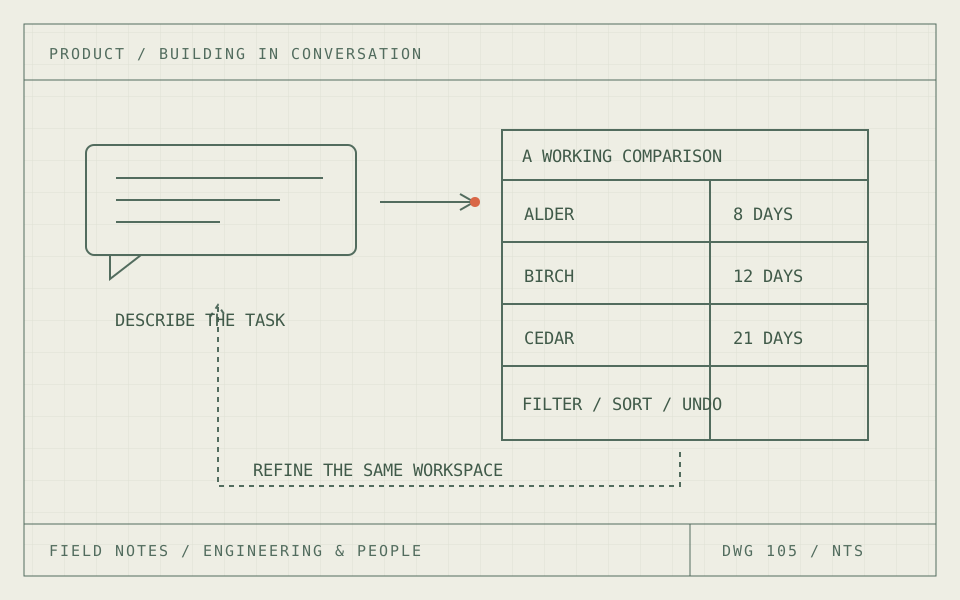
01 / BUILD THE WORKSPACE
The traditional dashboard is obsolete.
The future of software is building in chat. Describe the question, connect the right data and build the interface around the work in front of you. Keep changing it as the question changes. That makes the traditional, prebuilt dashboard obsolete as the default way to explore a business.
That is the argument of this article, and it is a forecast about where software is going. The product capabilities behind it are already here. The remaining question is how quickly organizations change the way they deliver software around them.
Think about the usual dashboard request. Someone defines a question. An analyst finds the data. A developer builds charts and filters. The user opens the finished page and discovers that the next useful question needs a different cut. Another request goes into the queue. The dashboard is a snapshot of what its author expected someone to ask.
When a conversation can produce a working dashboard, that whole arrangement loses its justification for exploratory work. The person with the question can build the view, inspect it and ask the follow-up immediately. The interface becomes part of the investigation instead of a prerequisite for starting it.
02 / BUILD THE WORKSPACE
You can already build a dashboard in a conversation.
Claude Dashboards provides a direct example. Connect a warehouse or a supported business app, ask a question and it builds a dashboard. Each chart has a SQL query you can inspect and a visible refresh timestamp. You can request another filter or a different time grouping through chat, then save and share the dashboard. The feature is currently in beta.
OpenAI documents another route through ChatGPT Sites: describe a dashboard or interactive application in a conversation, then build a persistent, shareable site. Its documentation also describes workspace-private Sites using each visitor’s connected apps, where enabled. Creating the view and making it available to other people can begin in the same conversation.
Microsoft is moving the entry point too. Power BI’s standalone Copilot, currently a preview, can work across accessible reports and semantic models. It can answer with visuals and use underlying measures when an existing report does not contain the answer. You can start with the question instead of locating the right report first.
These are different products with different limits. Together, they demonstrate the pieces that make the old dashboard workflow vulnerable: conversational authoring, access to business data, visual output and reusable results. My conclusion is that software built around a fixed catalog of pages will give way to software assembled around intent.
03 / BUILD THE WORKSPACE
The follow-up question becomes a build instruction.
Imagine asking, “Show late deliveries by supplier for the last quarter.” The first view appears. Then: “Compare those suppliers by unit cost.” Then: “Only include suppliers that can deliver within two weeks.” Each request changes the working surface. You are building the tool while using it.
A traditional filter works within choices someone already provided. A conversation can ask for a new dimension, query, calculation or interaction. That is the larger change. The next question does not have to fit the previous screen.
The small example below demonstrates that interaction. Start with a supplier comparison, add cost, narrow the lead-time window and change the ordering. The conversation and the direct controls update the same view. Once a slider or table exists, use it. Building in chat can produce ordinary, efficient controls without making you type every adjustment.
This particular demo is scripted and uses three fictional suppliers. It has no language model, live warehouse or external actions. It illustrates the interaction; the linked product documentation supports the claims about what current systems can build. Keeping that distinction visible matters when the article itself is making a strong prediction.
04 / BUILD THE WORKSPACE
The durable product is underneath the screen.
If the interface can be assembled on demand, the valuable work moves underneath it. What counts as a late delivery? Which quote is approved? Can two sites be compared fairly? Those definitions should be shared, governed and available to every generated view.
Microsoft explicitly calls out preparing semantic models for Copilot. A conversational interface still needs a reliable meaning for the fields it uses. A wrong join does not become correct because the chart arrived quickly. The same applies to permissions, freshness and the source behind each number.
Teams can expose those foundations through well-defined data tools and operations, then let the interface take different shapes. Google’s A2UI project offers one implementation pattern: an agent sends a declarative description and the client renders trusted components. The JSON sketch here illustrates an application contract; it is not an A2UI payload.
The application validates the requested fields, enforces access on the server and checks arguments before executing an operation. A draft order and a submitted order need separate actions. A generated interface should make the intended change reviewable before it affects another system. These are reusable capabilities that support many interfaces, rather than rules rebuilt for every page.
{
  "component": "SupplierComparison",
  "dataset": "approved-quotes-v7",
  "columns": [
    "supplier",
    "leadDays",
    "unitCost"
  ],
  "filters": {
    "maxLeadDays": 14
  },
  "sort": {
    "field": "unitCost",
    "direction": "asc"
  },
  "mode": "read-only"
}05 / BUILD THE WORKSPACE
Build once for this question. Keep what earns its place.
Some interfaces will exist for ten minutes. Others will become the team’s weekly operating view. Both can start in chat. A useful result should be saved, reopened and shared without making the next person repeat the conversation that created it.
That requires explicit state. Store the dataset version, filters, selected records and pending changes. If someone adjusts a filter directly, the next conversational request should preserve that choice. Keep revisions and Undo. Resolve conflicting edits instead of silently replacing someone else’s work.
A saved view can remain stable for an expert who wants the same controls every morning. An operations display can stay on the wall. Its useful layout does not require the old process of commissioning a separate application for each new question. Persistence and predictable controls are features that chat-built software needs to provide.
The harder cases are real: ambiguous requests, incorrect calculations, slow responses and inaccessible controls. Treat them as product requirements with tests, owners and operating limits. Measure whether a person reaches a correct result, can explain where it came from and can recover from a mistaken request. The demo’s Undo is a small version of that expectation.
06 / BUILD THE WORKSPACE
Stop planning software as a collection of pages.
For a director deciding where to invest, this changes the roadmap. A backlog of slightly different dashboards is a poor destination. Build the data definitions, access controls, queries and business operations that let people construct the views they need.
Start with a workflow whose results you can check: a supplier review, a capacity investigation or an account comparison. Give the conversational system approved sources and clear boundaries. Compare its output against known answers. Measure time to a correct decision, the work needed to correct mistakes and whether another person can reuse the result.
The economics are the reason I expect this to spread. A reusable data capability can support many questions. A fixed page supports the questions its author anticipated. As the cost of assembling an interface falls, maintaining a separate screen for every variation becomes harder to justify. That is a product argument, not a claim that today’s tools have already eliminated the work.
The old dashboards will remain installed for a while. Organizations have integrations, habits and reporting obligations. Their continued use does not make them the model to build toward. My position is that the future of software is building in chat: the question, the construction of the tool and the work itself happen in one place. Build the foundations for that future instead of extending the dashboard queue.
THE EXPERIMENT / CHANGE ONE THING
Build a view through a conversation.
Choose a scripted request, then use the resulting controls directly. Both routes edit the same comparison. Undo works across both.
SYNTHETIC EXAMPLE / LIVE RESULTS
SCRIPTED DEMO / NO AI SERVICE OR EXTERNAL CALLS
THE CONVERSATION
Choose a request above to start building the view.
THE WORKSPACE / FICTIONAL QUOTES V1
Your view will appear here.
Everything stays in this page visit. The requests are predefined transformations, not generated code. No supplier is contacted.
What this model assumes
Scripted local demonstration, not an AI chat service. Three fictional suppliers; costs are illustrative currency units per part. Lead time is a single fixed value, not a delivery promise. No live quotes, external calls, purchases or saved data. State lasts for this page visit. Filtering hides rows without deleting the underlying records.
SOURCES & FURTHER READING
The references behind the ideas.
The numbers in the experiment are illustrative. These references support the methods and distinctions discussed in the article.
- Anthropic / Build dashboards from chat ↗
Documents the beta dashboard feature: connected sources, chart queries, refresh timestamps, conversational changes, saving and sharing.
- OpenAI / Build a shareable site ↗
Documents creating dashboards and interactive sites through a conversation, with persistent storage and sharing controls. Availability and workspace requirements apply.
- OpenAI / Sites with connected data ↗
Documents workspace-private Sites with each visitor’s connected apps, where enabled.
- Microsoft / Standalone Copilot in Power BI ↗
Documents the preview conversational entry point across accessible reports and semantic models, visuals and data-preparation requirements.
- Google / Introducing A2UI ↗
A declarative interface format rendered from trusted client components. The JSON sketch is illustrative, not its specification.
- W3C / ARIA Authoring Practices ↗
Interaction and accessibility patterns apply to generated interfaces too.